
Note: Shopify integration update
Our previous Shopify integration is no longer supported during checkout. Shopify has removed access to checkout.liquid and now uses Checkout Extensibility, which requires a dedicated app. Because of this change, consent can’t be collected or passed to external tools (such as tag managers) during checkout.
Our previous integration doesn’t work during checkout in Shopify.
If you want to collect data on your Shopify store’s visitors you need to display a consent popup to ask to use their data. To achieve this, set up Cookie Information consent popup in Shopify.
In this article, we’ll show you how to do it.
Before you start
Here are a few things to know before you start:
- To learn how to customize your cookie consent template, see this style guide.
Set up Cookie Information consent popup in Shopify
To set up the Cookie Information cookie consent popup in Shopify, follow these steps:
- Log in to the Shopify account.
- Navigate to Online Store > Themes > Current theme.
- Click Customize.
- Click the ⋯ three-dot icon and click Edit code.
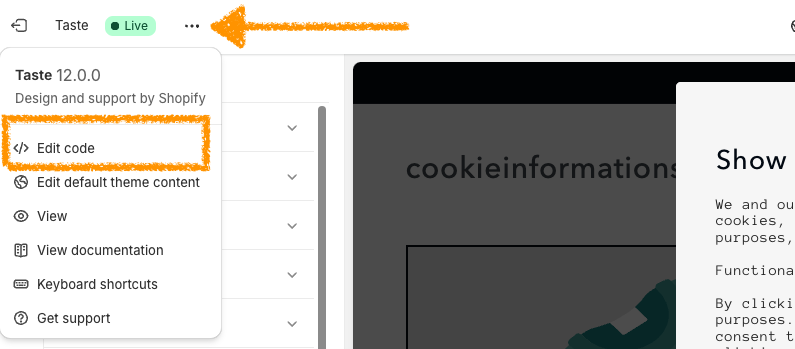
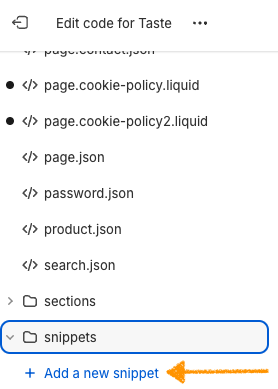
- Scroll down to Snippets and click Add a new snippet.
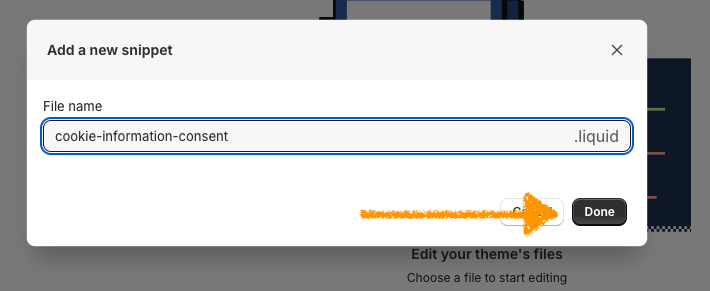
- Name the file ‘cookie-information-consent’ and click Done.
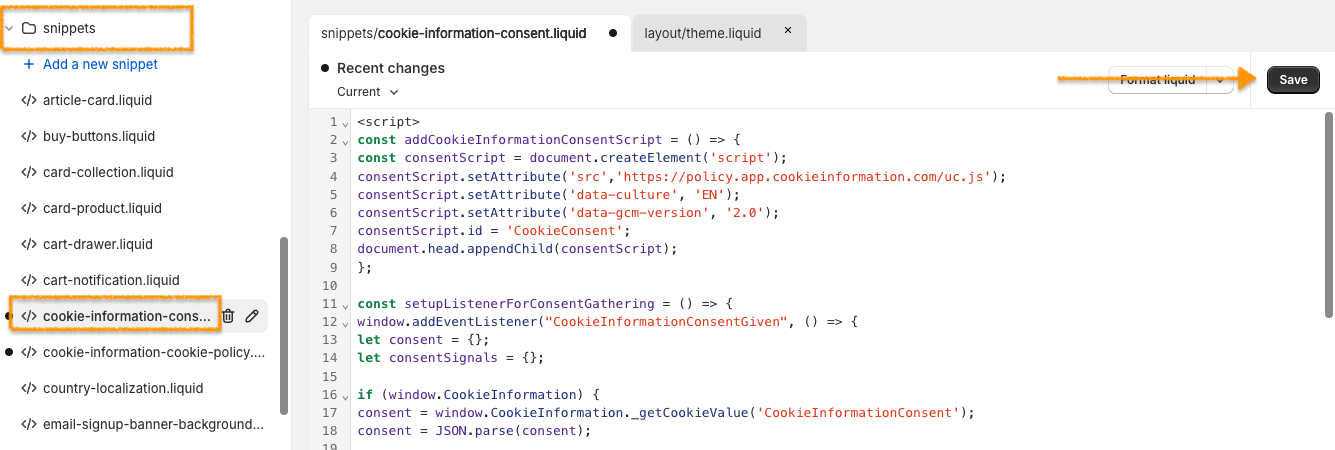
- In Snippets, click cookie-information-consent.liquid.
- Paste the Shopify installation code into the file:
<script>
const addCookieInformationConsentScript = () => {
const consentScript = document.createElement('script');
consentScript.setAttribute('src','https://policy.app.cookieinformation.com/uc.js');
consentScript.setAttribute('data-culture', 'EN');
consentScript.id = 'CookieConsent';
document.head.appendChild(consentScript);
};
const setupListenerForConsentGathering = () => {
   window.addEventListener("CookieInformationConsentGiven", () => {
       let consentSignals = {};
       let consentCookieReady = false;
       let customerPrivacyAPIReady = false;
       const checkAndSetTrackingConsent = () => {
           if (consentCookieReady && customerPrivacyAPIReady && Object.keys(consentSignals).length > 0) {
               window.Shopify.customerPrivacy.setTrackingConsent(
                   {
                       "analytics": consentSignals['cookie_cat_statistic'] || false,
                       "marketing": consentSignals['cookie_cat_marketing'] || false,
                       "preferences": consentSignals['cookie_cat_functional'] || false,
                       "sale_of_data": consentSignals['cookie_cat_marketing'] || false,
                   },
                   () => console.log("Cookie Information: consent gathered")
               );
           }
       };
       if (window.CookieInformation) {
           const consentCookie = window.CookieInformation._getCookieValue('CookieInformationConsent');
           if (consentCookie) {
               const consent = JSON.parse(consentCookie);
               if (consent) {
                   consentSignals = consent.consents_approved || [];
                   consentSignals = consentSignals.reduce((acc, curr) => {
                       acc[curr] = true;
                       return acc;
                   }, {});
                   consentCookieReady = true;
                   checkAndSetTrackingConsent();
               }
           }
       }
       const customerPrivacyAPIInterval = setInterval(() => {
           if (window.Shopify.customerPrivacy) {
               clearInterval(customerPrivacyAPIInterval);
               customerPrivacyAPIReady = true;
               checkAndSetTrackingConsent();
           }
       }, 100);
   });
};
window.Shopify.loadFeatures(
   [
       {
           name: 'consent-tracking-api',
           version: '0.1',
       },
   ],
   error => {
       if (error) {
           throw error;
       }
       setupListenerForConsentGathering();
       addCookieInformationConsentScript();
   }
);
</script>- Click Save.
Note: The attribute data-culture = "EN" controls the language in which the popup will appear on the page – in this example, it will be displayed in English. To change the language, set the data-culture attribute to a different language code. For more details, see this article.
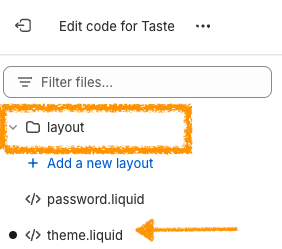
- Navigate to layout and click theme.liquid.
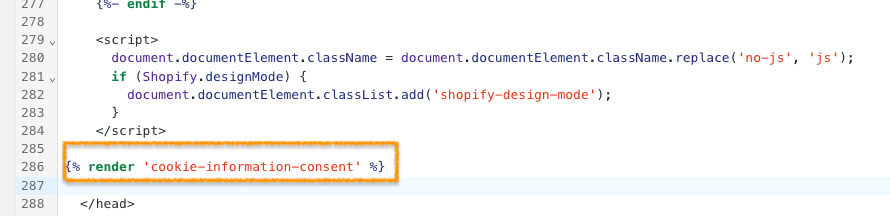
- Add the following code snippet
{% render 'cookie-information-consent' %}just before the closing</head>tag in thetheme.liquidfile, which is part of Shopify’s theme.
- Click Save.


