
You might want to change your consent popup template to match your site’s needs. For example, you may need to update the design to meet new privacy regulations or regional requirements.
In this article, we’ll show you how to change your consent popup template.
Before you start
Here are a few things to know before you start:
- Changing templates affects how your banner looks and behaves.
Change your consent popup template
To change your consent popup template, follow these steps:
1. Log in to Cookie Information.
2. In Consent solutions, find the consent solution you want to change the consent popup template.

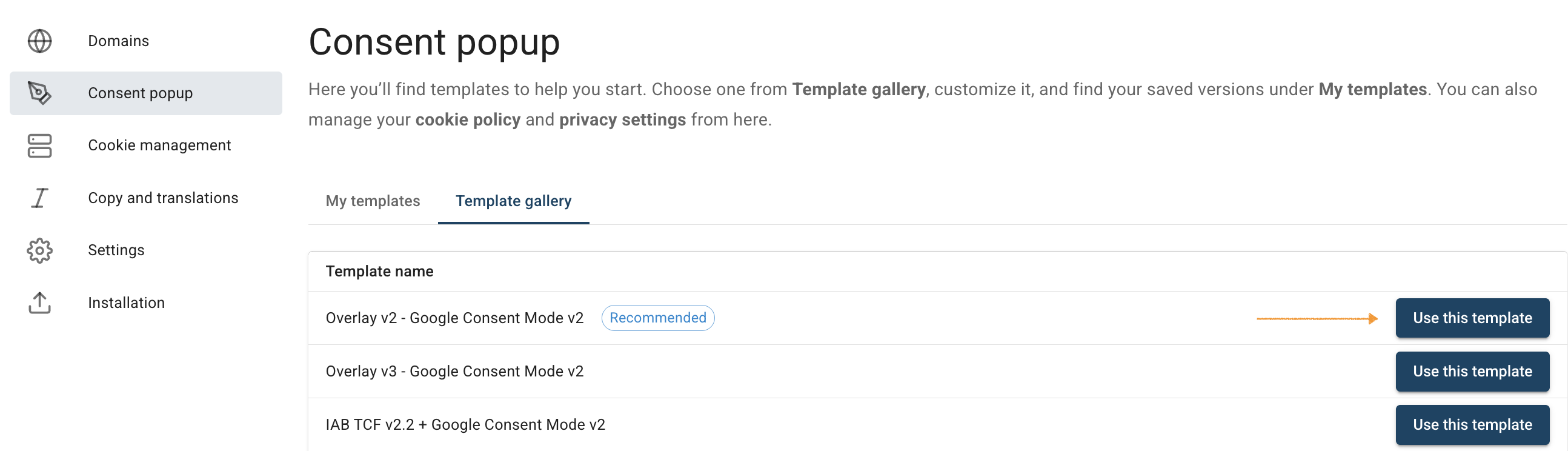
3. Go to Consent popup > Template gallery.
4. Find the template you want to use, and click Use this template next to its name.
5. (Optional) In Customize your template, you can use the visual editor to style your popup.
6. When you’re done styling, click Save and publish.
Note:
- Clicking Save only saves changes to your template. To publish the updated template, click Save and publish.
- Changes to your consent template may take up to 10 minutes to appear on your domain.
7. All set.


