
The GDPR gives users the right to access information about their data, including what they consented to and how it’s used. Providing this data builds transparency and trust while ensuring your organization meets legal requirements.
In this article, we’ll show you how to retrieve a unique user ID.
Before you start
Here are a few things to know before you start:
- When a user consents to cookies, Cookie Information sets the
CookieInformationConsentcookie in the user’s browser. - If a user requests their consent data, you as the website owner, need to ask the user to provide the user ID from the
CookieInformationConsentcookie.
Retrieve a user ID
To retrieve a user ID, follow these steps:
- Go to Chrome.
- Open the Developer Console: F12 on Windows or CMD + OPT + J on Mac.
- In Application, go to Storage> Cookies.
- Go to the website’s cookies.
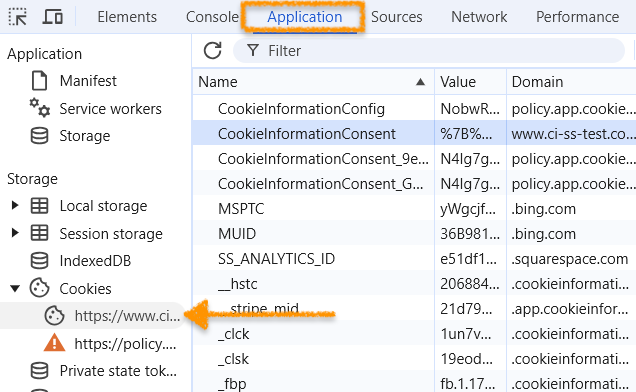
- Click
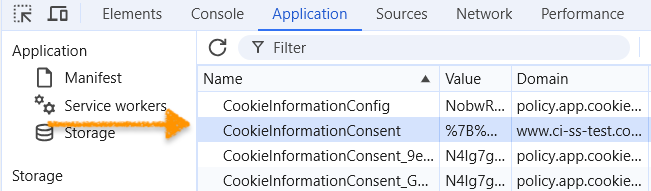
CookieInformationConsent.
- Find the cookie value and tick the box Show URL-decoded.
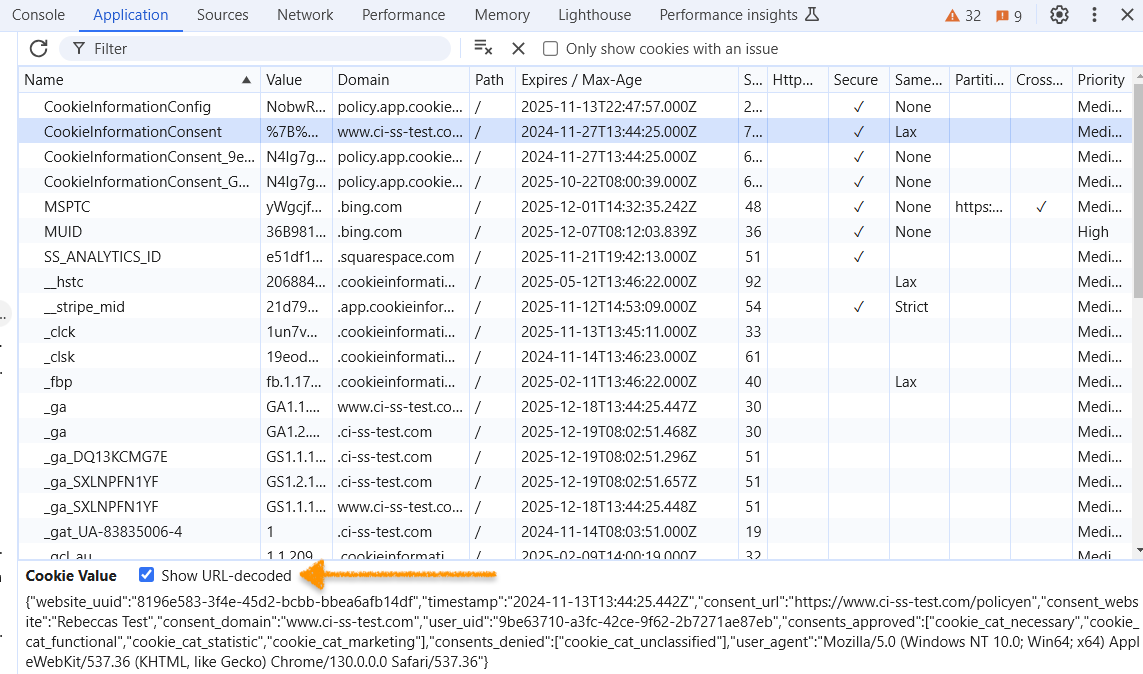
- In Cookie Value, copy the user ID that is:
"user_uid":"9be63710-a3fc-42ce-9f62-2b7271ae87eb". 
- Once you have the user ID, send it to our support at support@cookieinformation.com. We’ll send you a secure information package with a script your team can use to download the consent logs.
- Done.


